How do I stop a Play that's already in progress?
Last updated: June 17, 2026
Stopping a Play has two distinct meanings, and they map to two different actions in Unify.
Pause: stop new enrollments
Pausing a Play prevents new contacts from being enrolled but does not affect contacts who are already mid-execution. If a contact was prospected and enrolled in a sequence before the Play was paused, that sequence continues to run.
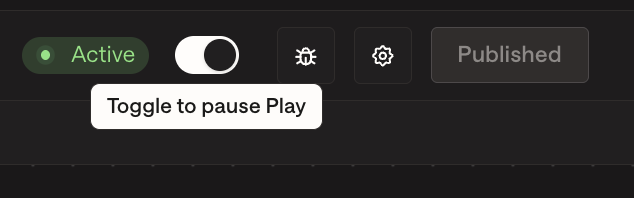
To pause: open the Play and click the pause toggle. New enrollments stop immediately.
This is the right action when:
You want to stop future enrollments but let in-flight contacts complete their sequence.
You're investigating an issue and want to halt new activity without disrupting customers already in the sequence.
Cancel: stop in-progress executions
If you need to terminate contacts who are already mid-execution, you can cancel Play executions individually or in bulk from the Play Builder.
To cancel in-progress executions:
Open the Play in Play Builder.
Go to the Logs tab.
Select the executions you want to cancel.
Open the Cancel dialog and confirm.
Canceling stops the executions immediately. Contacts who are partway through prospecting or enrichment will not proceed to sequence enrollment. Contacts already enrolled in a sequence are not automatically unenrolled by cancelling the Play execution — see below.
To also unenroll contacts already in the sequence
If contacts have already been enrolled in a sequence as a result of the Play, cancelling the Play execution does not remove them from the sequence. To unenroll them:
Go to the Sequences tab and open the affected sequence.
Click Enrollments.
Filter or search to select the contacts you want to remove.
Click Unenroll in the bottom right.
For large batches, the system processes un-enrollments in batches of ~100 in the background — allow 10–15 minutes for the full queue to complete.
Alternative: exclusion-based unenrollment
For ongoing scenarios where you want to automatically remove contacts who match certain criteria:
Create a People-level or Company-level exclusion in Settings → Organization → Exclusions.
Enable the Exclude from Sequences toggle on the exclusion.
Exclusion changes can take 30–45 minutes to propagate.
Quick guide: which action to use
Goal | Action |
|---|---|
Stop new enrollments, let in-flight contacts complete | Pause the Play |
Stop in-progress executions but leave already-enrolled contacts in their sequence | Cancel executions (Play Builder → Executions tab) |
Fully halt all activity — Play, executions, and sequence enrollments | Pause + Cancel executions + Bulk unenroll from the sequence |
Permanently block specific contacts going forward | Create a People-level exclusion with Exclude from Sequences on |