Troubleshooting tasks not appearing in dashboard
Last updated: February 25, 2026
If you're experiencing issues with tasks not appearing in your dashboard or taking longer than usual to populate, here are the most common causes and solutions:
System delays and backups
Occasionally, there may be temporary system delays that cause tasks to take longer to appear in your dashboard. If you notice tasks are loading slowly or not appearing at all, this could be due to a system backup that our team is actively working to resolve.
In these cases, the issue is typically resolved quickly. You can reach out to support to confirm if there are any known system issues affecting task population.
Tasks excluded from sequences
One common reason tasks may not appear is when contacts fall into exclusions after the first step of a sequence. When this happens, the tasks are effectively removed from your view even though you may still receive notifications about them.
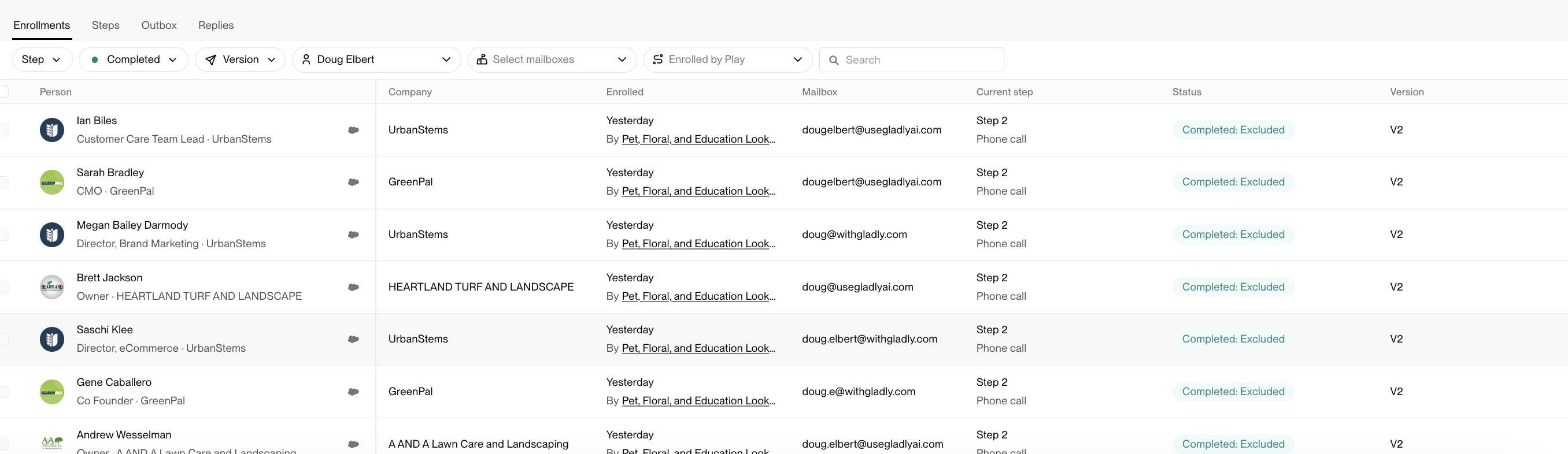
To check if this is the issue, review the sequence status for the contacts in question and look for any exclusion criteria that may have been triggered.
User permissions and task visibility
Task visibility depends on your user permissions:
Admin users can see all tasks across the organization
Regular users typically only see tasks assigned to them
If you're an admin and want to see only your assigned tasks, use the "user" filter at the top of the task dashboard to filter by your name.
Quick troubleshooting steps
Refresh your browser - Sometimes a simple refresh will load missing tasks
Check task filters - Ensure you haven't accidentally applied filters that are hiding your tasks
Verify sequence status - Check if contacts have been excluded from sequences
Contact support - If tasks are still missing after trying the above steps, reach out to the support team for assistance
Most task visibility issues are resolved quickly with these troubleshooting steps. If you continue to experience problems, our support team can investigate further and provide specific guidance for your situation.