Can I remove the unsubscribe sentence from email sequences?
Last updated: March 25, 2026
To adhere to CAN-SPAM regulations, it is not possible to completely remove the unsubscribe option from email sequences. However, you can customize the language used for the opt-out message.
Customizing the Unsubscribe Message
To modify the unsubscribe text in your email sequences:
Navigate to the Sequence Settings page
Go to the "Rulesets" tab
Adjust the text for the opt-out message.
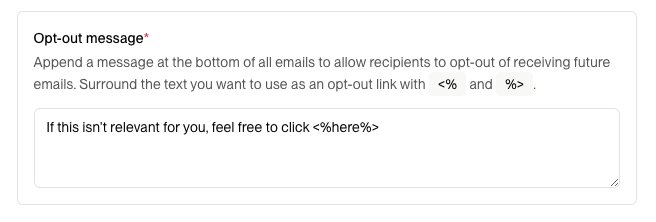
You can adjust the opt out message in your Sequence Settings.
Note: While you can customize the wording, it's crucial to ensure that the message still clearly communicates the option to unsubscribe from future emails. This is necessary to maintain compliance with anti-spam laws. Removing opt-out messages entirely is not legally compliant with CAN-SPAM regulations and could lead to legal and reputational risks.
Important: Unsubscribe disclosures are automatically included in all emails sent to actual prospects, but they are not displayed in test emails to avoid confusion. If you don’t see the unsubscribe link when testing, this is expected behavior – it will appear when you send emails to real recipients.