Best Practices: Holiday Send Schedules
Last updated: December 10, 2025
Goal
Help your team reduce OOO bouncebacks and improve reply rates during the holidays by pausing sends on high-OOO days. Designed to help your team avoid wasted touches and keep sequences performing during low-engagement periods.
Why It Matters For You
Intent-based outreach only works when messages actually land in inboxes.
Holiday OOO season creates noise, lower reply rates, and stalls pipeline.
For Example: “A perfectly written email won’t drive replies if it hits an inbox while your prospect is OOO.”
What People Do Wrong
Send sequences straight through holidays.
Keep standard schedules without adjusting around peak OOO windows.
Unify's Best Practice Recommendations
Add skip dates before and after official holidays.
Use a dedicated holiday send schedule for December–January.
How to Apply / Set Up / Build
1 | Identify high-OOO days before and after holidays to reduce dead-end touches and protect sequence performance.
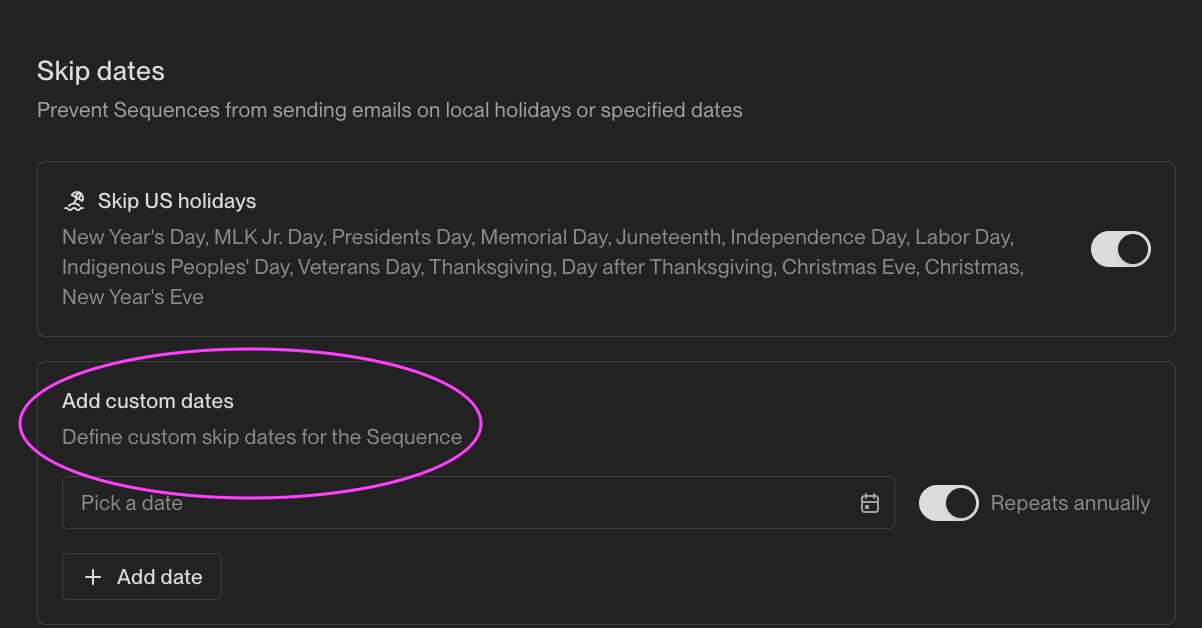
2 | Go to Settings → Sequences → Send Schedules and add custom skip dates and ensure all sequences using that schedule automatically pause.
3 | Apply this schedule across active sequences during holiday windows to keep outreach aligned to when prospects are actually online.
Pro Tips
Add 1–2 buffer days before and after each holiday.
Use a dedicated "Holiday Schedule" you can reuse each year.
Reminder: changing a send schedule updates every sequence tied to it—no manual edits needed.
Example: Adding Dec 23–26 + Jan 1–2 as skip days will meaningfully reduce OOO replies.
Measuring Success / Results / How To Know You Are Doing This Right
Lower OOO reply rate
More replies from active prospects
Healthier early-January pipeline